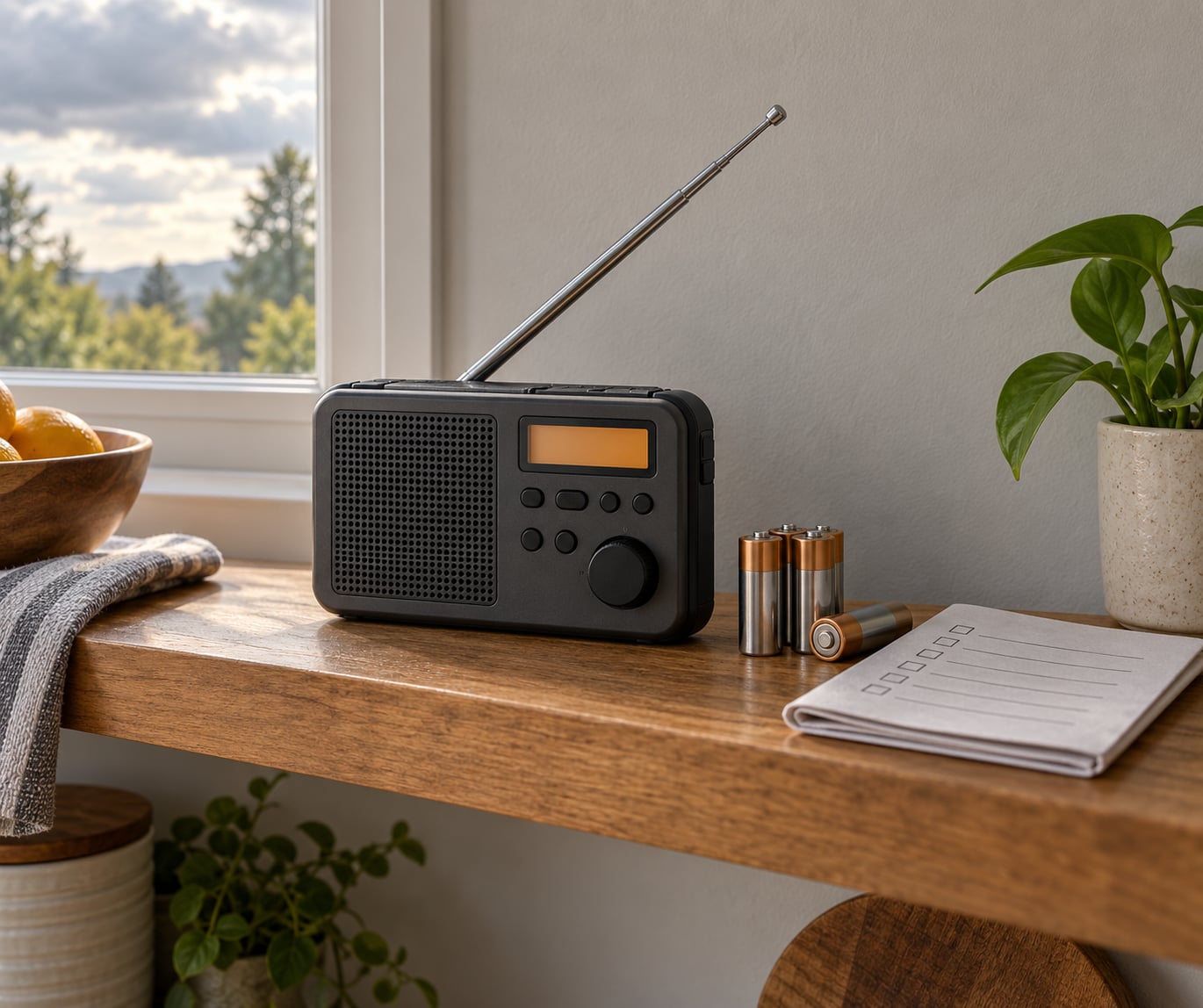
Setting up a NOAA weather radio takes about 15 minutes: fit the backup batteries, extend the antenna fully, plug in the power adapter, find your 6-digit S.A.M.E. county code, enter it, then tune to the clearest local channel and press Test. That is the whole process, and it is model-agnostic. Once it is right, the radio stays silent until something actually affects your county.
The reason people bother is what it does not depend on. A phone alert needs power, a charged battery, a working data connection and a tower that is still standing. A NOAA weather radio needs a set of batteries and a broadcast signal, and it keeps working when the grid is out and the towers are down.
More than 1,000 transmitters across the country broadcast National Weather Service information around the clock on seven channels between 162.400 and 162.550 MHz. Every alert is preceded by a digital header carrying the event type and the county it applies to — that is Specific Area Message Encoding, or S.A.M.E., the same Emergency Alert System technology that drives warnings on broadcast radio and television. Program the code, and the radio ignores everything aimed at the other 3,000 counties. Update for 2026: the menu paths and frequency guidance below are current.
Table of Contents
- What You Need
- How to Set Up a NOAA Weather Radio Step by Step
- Common NOAA Weather Radio Setup Mistakes
- Maintain Your NOAA Weather Radio
- Frequently Asked Questions
- Do I need an Internet connection to use a NOAA weather radio?
- What is the best NOAA weather radio for emergency alerts?
- Why does my NOAA weather radio make loud crackling noises?
- How often should I test my NOAA weather radio?
- Can I use a NOAA weather radio during a power outage?
- What if I live in a basement or remote rural area with weak reception?
What You Need
Almost anyone can start with a plug-in radio from any electronics retailer or the local National Weather Service office. The list below is what actually matters when you choose one.
- A radio that decodes S.A.M.E. alerts. This matters most. A plain radio tuned to a NOAA channel broadcasts every alert for every county within about 100 miles of the transmitter, including counties you have nothing to do with. Without S.A.M.E. decoding you get a genuine warning about a storm 90 miles away that you cannot do anything about, roughly once a week.
- A battery compartment with backup power. Look for a radio that keeps sounding an alert for several minutes on batteries alone after the mains power drops.
- An extendable antenna. Telescoping antennas reach full length on desk models. Handheld units usually have a fixed short antenna, which is a real limitation indoors.
- Your S.A.M.E. county code. The official NOAA county coverage listing at weather.gov gives you every code for your state, and the automated line at 1.888.NWS.SAME reads you the code for the county you are standing in.
- A spot near a wall or a high shelf. Signal strength is decided by the room, not the model, more often than not.
Radio type decides how far each one stretches. The phone app sits at the bottom for a reason.
| Radio type | Power source | S.A.M.E. county filtering | Works with no cell signal | Best for |
|---|---|---|---|---|
| Desk or kitchen model with mains adapter | Power adapter plus backup batteries | Yes, usually 5 to 20 counties | Yes | Homes in flood, tornado and severe-thunderstorm country |
| Handheld or portable model | Batteries, often AAA | Yes on newer models | Yes | Go-bags, vehicles, boats, a second room |
| Hand-crank or solar model | Crank, solar panel and internal battery | Varies; many older ones lack it | Yes | Households with no reliable mains power for long stretches |
| Amateur handheld (Baofeng, Yaesu, Icom) | Batteries | No — receive only, no alert filtering | Yes | People who already own one and want continuous audio |
| Smartphone app | Battery, plus data | Location-based, push notifications | No — needs a working network | Convenience, as a backup to a radio |
One note for UK and Irish listeners: NOAA Weather Radio is a United States system and there is no equivalent transmitter network here. UK emergency alerting runs through mobile phone Emergency Alerts and the Emergency Alert System, and local radio and TV carry EAS-style bulletins. If you searched for a NOAA radio and live outside the US, what you are looking for is a UK receive point radio with alert tones — a different network with a similar idea.
How to Set Up a NOAA Weather Radio Step by Step
Here is the short version, then each step in detail.
- Insert the backup batteries. Fresh ones, in the compartment, before anything else.
- Extend the antenna to full length and stand the radio upright.
- Plug in the power adapter and switch the radio on.
- Set the volume high enough to hear across a room, then set the language and tone.
- Find your S.A.M.E. county code from the NOAA county coverage listing or 1.888.NWS.SAME.
- Program the code: press MENU > Set Location > SELECT, then key in your 6 digits.
- Tune to the strongest local channel and choose which alert types sound.
- Press Test and listen for the tone, then write your settings down.
Choose the NOAA Weather Radio Type
If you already own a radio, read this bit anyway — most reception complaints turn out to be a radio without S.A.M.E. decoding rather than a bad signal.
Basic weather radios receive the broadcast and nothing more. They are fine for a house on a single transmitter’s coverage, but they will alert you about every county in the signal footprint.
Alert-enabled radios with S.A.M.E. These decode the header and only sound for the codes you enter. Most current desk models do this out of the box and hold five counties, some hold twenty. This is the category to buy.
Models with battery backup switch to batteries automatically when mains power fails. Check the manual for how many batteries it takes and whether the alert tone keeps sounding on battery power rather than just the clock display. A radio with a backup compartment but no battery alert output is only half useful.
Hand-crank and solar radios are worth a mention because they never need a wall outlet. What they add: survival capability. What they do not add: sensitivity. The small antennas and tiny speakers on these units usually need the radio in the same room as the window. Many of the cheapest models also skip S.A.M.E. entirely, so read the specification list before buying one as your only radio.
Phone apps and satellite services are genuinely useful, and they are a second line rather than a substitute. They fail for exactly the reasons a radio does not: dead battery, dead tower, congested network, a plan that stopped working last month. Keep one installed and keep a radio running.
Find Your Local NOAA Weather Radio Station
Your S.A.M.E. code is six digits: the first three are the state or territory code, the last three identify the county or parish. Zero-padded, so Tennessee looks like 0-4-7 rather than 47.
The NOAA county coverage listing at weather.gov is the authoritative source. It returns every code for your state, which matters if you live near a county line or want alerts for a neighbouring county. The phone line at 1.888.NWS.SAME takes a phone number, gives you the code for that location and repeats it back. Neither needs an account, a login or a data plan.
Households on a border should enter two codes, and sometimes three. If you sit 300 yards from the county line, the storm that produces your tornado warning may well be the one officially assigned to the next county over.
Then pick a channel. Seven NOAA frequencies exist, and the honest truth is that the one covering your house is the one to use. Try them in order and keep whichever gives the cleanest signal.
| Frequency | When to use this channel |
|---|---|
| 162.400 MHz | Your local transmitter sits on it — often a secondary channel for a smaller town |
| 162.425 MHz | Occasionally used as a second local channel; try it when 162.400 is noisy |
| 162.450 MHz | One of the busiest channels, commonly the primary for a mid-sized transmitter site |
| 162.475 MHz | Used by several transmitters; a strong candidate when the others hiss |
| 162.500 MHz | The most widely assigned channel in the network and a sensible first try in many areas |
| 162.525 MHz | Carries continuous weather plus longer regional forecast blocks in some regions |
| 162.550 MHz | A common primary for stations covering smaller or coastal areas |
Channels with no transmitter near you produce a steady hiss that never goes away. That hiss is not a fault. Switch to the next channel.
Power the Radio and Set the Controls
Batteries go in first, before the adapter. Most units will boot with either, but fitting the cells first means the clock keeps correct time after an outage instead of resetting to 12:00.
Use alkaline cells rather than rechargeable ones for the backup compartment. Rechargeables sit at a lower voltage and shut down early, which is exactly the wrong failure in the middle of a warning. Fresh alkaline cells in a battery-backup radio run for roughly a year of normal listening and considerably longer if you leave the volume low.
Plug the adapter into the wall and into the radio, then switch it on. Turn the volume up until you can hear it from the next room — this is the single most common reason people miss a warning. Then set the language if you want Spanish, and choose the alert type: tone only, voice only, or both. Voice-only alerts wake a household better overnight; tones are harder to sleep through.
Position the Radio for Reliable Reception
Place the radio somewhere you will actually hear it while asleep, with the antenna fully extended. A bedroom is often the right answer for one radio; a kitchen radio will not wake anybody at 3 a.m.
Signal dies in predictable places. Metal, foil-backed insulation, concrete and thick brick all eat it. A basement is the worst case in most houses — if the radio lives down there, expect the hiss and expect to move it.
Windows help, because the glass gives you line of sight to the transmitter. But a metal screen or a low-emissivity coating on newer double glazing blocks a lot of signal, so treat a modern window like a wall. The blunt advice from people who run these radios is that NOAA stations can be spotty and finicky, so move the radio. That is correct more often than any antenna upgrade.
If a window shelf gives you a clear signal and a kitchen shelf does not, use the window shelf.
Tune the Radio and Enable Weather Alerts
Scan the seven channels slowly and stop where the background is quietest. Silence, or a barely there hiss, is your channel. Loud static means the transmitter is too far away to use.
Set the channel and lock it. Auto-scan sounds helpful and is not, because the radio will wander to a dead channel during the warning you needed it for.
Then choose which alerts sound. This is where most setups go wrong in the other direction. Tornado Warning, Severe Thunderstorm Warning, Flash Flood Warning and Hurricane Warning should always be on. Leave watches and advisories on too, but understand the difference:
- Watch means conditions are possible. Forecasters expect them within hours.
- Warning means it is happening or about to. Act now.
- Advisory means something notable is occurring that does not reach warning criteria.
Turn everything on and you will get alert fatigue within weeks — and people who turn everything off are the ones who miss the warning. Leave warnings on, keep watches on if you can stand them, and ignore advisories if they irritate you.
Do not disable the Required Weekly Test. Every NOAA transmitter broadcasts it on a schedule, usually a few seconds on a fixed weekday and hour. That short weekly broadcast is how you know the radio, the antenna and the batteries all still work, without waiting for a real emergency. Radio operators call it the RWT and it is the closest thing this system has to a health check.
Test the NOAA Radio Before an Emergency
Press Test. The radio sounds the alert tone, flashes the alert light and speaks the alert message if it has a voice chip. If it does all three, the speaker, the light and the decoder work.
Do it every month. Press it the morning after a storm as well, because a storm is the only time the station transmits something long enough to reveal a problem that a test will not.
Write three things down and tape them to the back of the radio: the channel number, your S.A.M.E. code, and the date you last checked the batteries. That note is the difference between a two-minute fix and a puzzled hour on the night of a warning.
Set Up Multiple Radios for Household Coverage
One radio covers one room. Two or three inexpensive units beat one expensive one if the point is to wake the whole house.
A workable layout: one by the bed, one in the kitchen where someone is awake during the day, and one in a basement, storm shelter or garage workshop if that is where your family shelters. Program the same code on all of them, so they behave identically.
Add a second county code to each unit rather than buying different radios for each county. Most desk models accept up to five and better ones accept twenty.
For a go-bag or vehicle, a small handheld with alkaline cells is the right pick. Keep one crank model in the car or the shelter as a last resort. Avoid buying four models of the same thing — two desk radios plus one handheld covers almost any house without duplicate equipment gathering dust.
Common NOAA Weather Radio Setup Mistakes
Most “my NOAA radio does not work” reports come down to one of the following.
Wrong channel. The radio is on a frequency with no transmitter in range, so all you hear is hiss. Cycle through all seven and pick the quietest. This accounts for most reception complaints.
Radio set to the wrong modulation on a two-way. If you are using an amateur handheld such as a Baofeng or Yaesu VX-7R to listen instead of a dedicated weather radio, the NOAA channels need wide FM, not narrow FM. Setting the modulation to WFM is what restores audio; leave it on NFM and the channel is silent and people assume the radio is broken. Worth knowing: those NOAA channels are receive-only. You will not be able to transmit on them, whatever the channel list looks like.
Dead or wrong batteries. Rechargeable cells in the backup compartment shut down before they are empty. Swap for alkaline, and replace the whole set yearly rather than waiting.
Alerts turned off. After a few nuisance tones, some people switch warnings off entirely and forget. Check the alert-type menu once a year.
Radio tucked in a basement or behind foil-backed insulation. Move it upstairs and toward a window before you conclude anything about the antenna.
S.A.M.E. code for the wrong county. You may be hearing alerts for a county 40 miles away and nothing for your own. Re-check the code against the NOAA county coverage listing, and add the neighbouring county if you live on a line.
Nearest transmitter off the air. Local outages do happen, and the fix is the second channel. If your channel has been silent for weeks when it used to work, try another before buying a new radio.
Everything wrong, start over. Nearly every model has a factory reset. On Midland radios the path is MENU > Setup > Setup Menu Options > Reset, and other brands use Setup, System or Configuration instead. The reset clears your codes and channel, and it is the right move after a code is entered wrong and will not take. Redo the eight steps in order and write the values down again.
Maintain Your NOAA Weather Radio
A monthly five-minute routine covers almost everything.
- Press Test and confirm the tone and light both work.
- Check the channel still sounds clear and the antennas are still fully extended.
- Wipe the case and speaker grille with a dry cloth; kitchen grease muffles small speakers.
- Note the weekly RWT — if you did not hear it, your channel or battery is compromised.
- Once a year, replace every battery and re-check the code against the county listing.
- Add the radio to your emergency supplies list next to the first aid kit and water, so it is checked with everything else.
If you also own a handheld or GMRS radio, keeping it programmed with a NOAA channel means continuous audio with no alerts interrupting you, which is why GMRS users often store the NOAA channels as named presets.
Frequently Asked Questions
Do I need an Internet connection to use a NOAA weather radio?
No. NOAA Weather Radio is a one-way broadcast system, so the radio receives forecasts and alerts straight from a National Weather Service transmitter with no internet, no data plan and no account. It keeps working when broadband goes down, when mobile data is congested and when cell towers lose power. That independence is the main reason to own one alongside your phone.
What is the best NOAA weather radio for emergency alerts?
The best one is a desk or kitchen model with S.A.M.E. county filtering, a mains power adapter and a battery compartment that keeps sounding the alert tone on batteries. Add at least one identical second unit in the bedroom, since one radio only covers one room. A hand-crank model is worth having as backup if your household loses mains power for long stretches, but check that it decodes S.A.M.E. alerts too.
Why does my NOAA weather radio make loud crackling noises?
Loud crackling usually means you are tuned to a frequency with no transmitter in range, so you are hearing the noise floor. NOAA weather radio broadcasts in a quiet band, unlike FM, so every channel with no signal hisses constantly. Cycle through all seven frequencies and stop where the background is quietest. Moving the radio nearer a window or higher up a wall also clears up weak reception.
How often should I test my NOAA weather radio?
Press the Test button once a month and listen for the tone, the alert light and any spoken test message. Every NOAA transmitter also broadcasts a Required Weekly Test on a fixed day and hour, so listen for that short weekly broadcast as proof the signal, antenna and batteries are all still working. Replace the batteries annually, and re-check your county code against the NOAA listing once a year.
Can I use a NOAA weather radio during a power outage?
Yes, and that is the main scenario it is built for. Fit alkaline backup batteries and the radio keeps receiving the broadcast and sounding alerts, usually for a year or more of normal listening. The manual will say whether the alert tone and voice output continue on battery power, since some models keep the display lit but mute the speaker. Test it before the season by unplugging the adapter and confirming the tone still sounds.
What if I live in a basement or remote rural area with weak reception?
Start by moving the radio out of the basement to an upper floor and toward a window; concrete and metal block a lot of signal. If you are far from a transmitter, try each of the seven channels and pick the quietest, since a stronger station may be on a different frequency than you expect. Enter neighbouring county codes so alerts from nearby counties still reach you. A hand-crank model with an external antenna helps in remote areas.
Start with the radio you already own. Fit fresh alkaline batteries, extend the antenna, plug it in, and set the volume high enough to hear from another room. Look up your 6-digit county code at the NOAA coverage listing, enter it at MENU > Set Location > SELECT, cycle the seven channels until one is quiet, and press Test. Fifteen minutes and a note on the back of the case is a working setup — the kind that gets you out of bed at 3 a.m. with ten minutes to spare instead of finding out from a neighbour in the morning.